The system of record for AI-assisted approvals
One approval system for every tool your team writes in.
OneApproval gives Word, Google Docs, Confluence, Canva and the rest a shared approval system. Send, review and audit without leaving the document.
Connectors
Word
Confluence
Google Docs
Canva
monday.com
Miro

The problem is widespread, and underserved.
450-respondent survey · Q2 2026
61%
of teams need approvals across more than one platform. Microsoft 365 with Google Workspace, Canva, Confluence.
Cross-platform need
10%
use any dedicated approval tool today. The other 90% rely on email, chat, document comments, or a meeting.
Tool adoption gap
51%
say email is where approvals happen now. The largest channel by a margin. Closest competitor: comment threads.
Where approvals live today
What we're solving
Every team we talked to had the same approval pains.
Survey data on where time goes, interview material on how it feels. Names below are roles, not companies.
01 · Scattered feedback
Five tools, no source of truth.
Comments in Word. Threads in Teams. A revision in Google Docs. Approvals get reconstructed from screenshots and memory.
"Most of our release approvals still happen in Outlook threads. Harder to audit than the plugin, sure. But the plugin doesn't reach the platforms our teams actually write in."
Platform Governance Lead, global payments processor
02 · Slow chasing
Most of the work is the follow-up.
Approvers wait for nudges. Authors play project manager. Decisions hide in inboxes for days because no one knows they are owed.
"People tune the email notifications out. Many of our approvers never see them. We'd put this in Teams tomorrow."
Senior Quality Manager, orthopedic medical-device manufacturer
03 · Unclear status
"Is this the approved version?"
Versions branch. A typo gets fixed after sign-off. The next person cannot tell if what they're looking at is the same thing leadership signed off.
"We moved everything onto one platform specifically to escape the version chaos. You couldn't tell which file was current, let alone which had been signed off."
Solo Compliance Lead, HR-tech SaaS
Why now
The governed layer through which AI-assisted work earns human sign-off.
AI agents are starting to draft, revise and route documents on behalf of people. The volume of work that needs human judgment is about to grow dramatically.
Approval becomes one of the critical moments where accountability, trust and compliance are established. That moment cannot be left to ad-hoc tools improvised inside each organization's AI stack. It needs a purpose-built system of record.
01 · Governance
Repeatable workflows, codified once.
Templates and stages that match how your org actually approves things. Defined by the people who own the process, used by the people who don't want to think about it.
02 · Visibility
Cross-platform view of every decision.
One place to see what's pending, what's signed off, what's stuck. Regardless of which tool the document lives in or which AI drafted it.
03 · Audit by design
Compliance evidence isn't bolted on.
Every action is recorded as it happens, pinned to the platform version it touched. The audit trail is a by-product of using the product, not a separate effort.
API first
Built for AI-assisted work. API-first.
OneApproval ships with a public REST API. When an AI agent drafts or revises a document, it can submit it for human approval programmatically. The same governed workflow, audit trail and version-pinning apply.
Now
Public REST API at launch
Now
Agents submit work for human sign-off
Soon
MCP support on the roadmap
REST API
One system, every platform
The same workflow and the same audit trail, no matter where the document lives.
Send, route, approve, audit. The same four steps for every document, run right where it already lives. OneApproval keeps the record.
W
Word
Q3 Marketing Plan.docx
v.4 · Author
Sent for review
01 · Send
The author starts the approval from the task pane in Word. No context-switch, no second tool to open.
W
Word
Q3 Marketing Plan.docx
v.4 · Approver
In review
02 · Route
The right reviewers, in the order you set, without leaving Word. Reminders and escalations are automatic.
W
Word
Q3 Marketing Plan.docx
v.4 · Approver
Approved
03 · Approve
Approvers decide in the document itself: the Word task pane, the web app, or an email link. No host-platform license needed for external reviewers.
W
Word
Q3 Marketing Plan.docx
v.4 · Approver
Recorded
04 · Audit
One record. Every action timestamped, every version pinned. Exportable as CSV or PDF.
Available today via AppFox
Confluence
monday.com
Miro
Joining OneApproval from 2026
Word
Confluence
Google Docs
Canva
monday.com
Miro
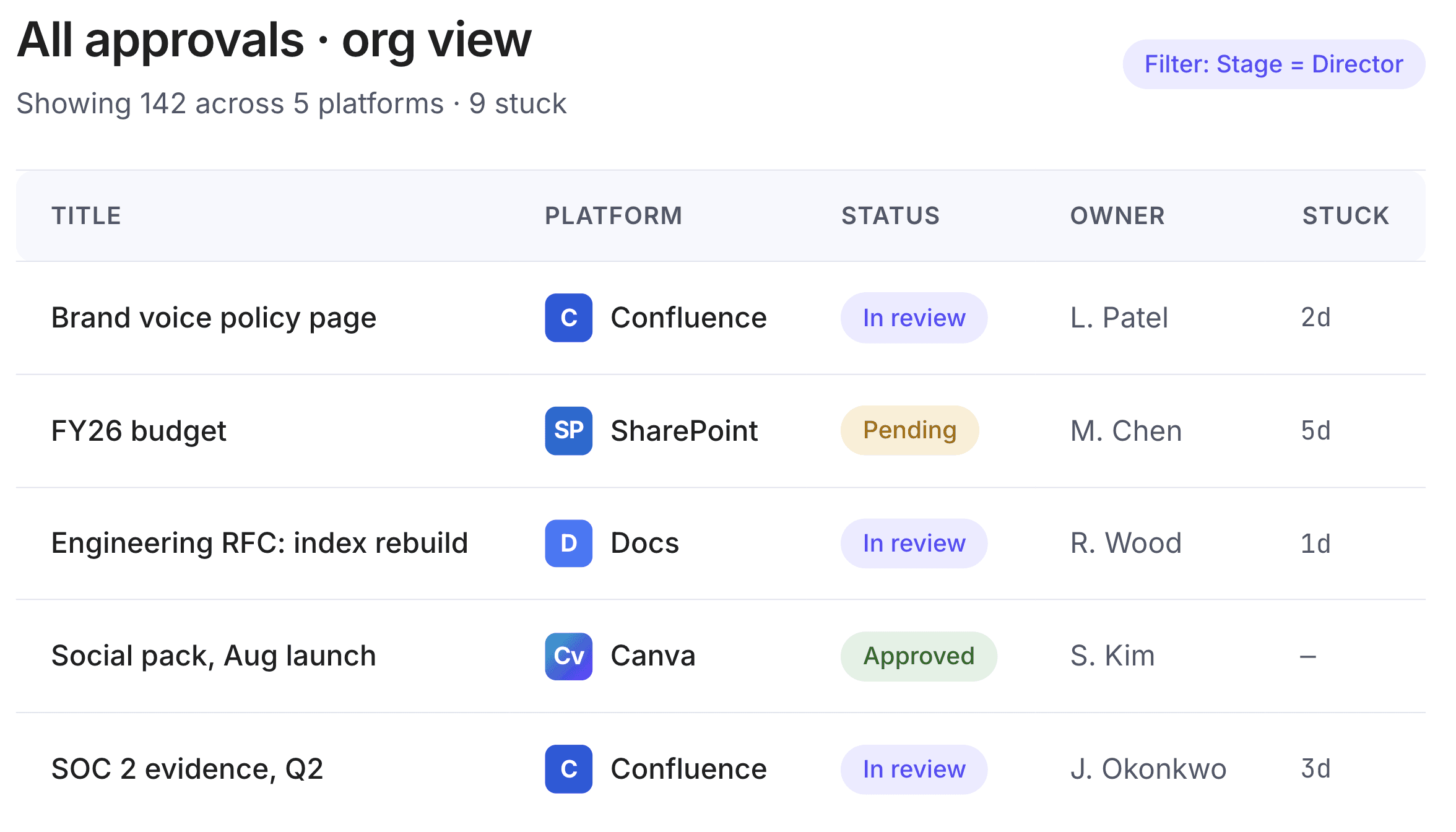
Cross-platform dashboard
One place for every approval, across every tool.
Stop opening five apps to find out where a decision is stuck. OneApproval gives every author, approver, and process owner a single view.
Filter and search by platform, type, status, stage or approver.
Bulk actions across documents, even when they live in different platforms.
Open the source file in one click. Word opens in Word, Confluence in Confluence.
app.oneapproval.io/all
In the tools you already use
Finish the approval where the work already lives.
Authors and approvers don't leave Word, Google Docs or Confluence. The OneApproval task pane brings the workflow to them: same actions, same context, native feel.
W
Word
C
Confluence
D
Google Docs
Cv
Canva
m
monday.com
M
Miro
app.oneapproval.io/all
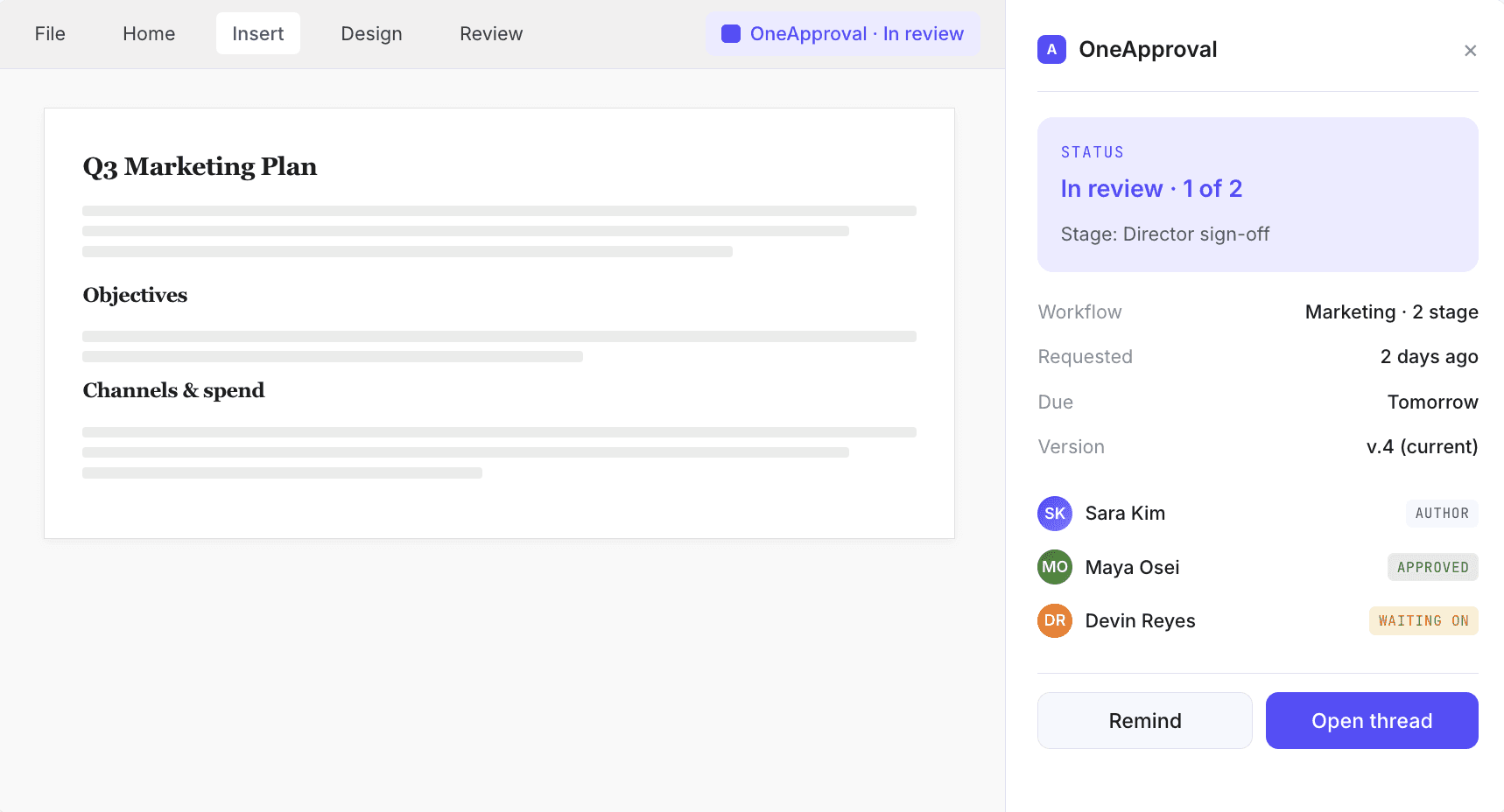
Status in the document, not buried in a menu. Glance and know.
Approve, reject, or comment without leaving the document.
SSO in one click for Microsoft 365 users.
Email-link approvals for external SMEs, such as legal counsel. No host-platform license needed.
Proactive notifications through email, Teams and Slack. Not gated by who's checking which app.
See the Word connector in detail →
The shape of a request
Send. Route. Approve. Audit. The same steps for every platform.
01
Send.
Start an approval from the task pane in Word, the byline in Confluence, the side panel in Google Docs. Pick a template or build a one-off route.
→ Author chooses approvers, due date, stages.→ Version pinned automatically.→ Email and native notifications fire.
02
Route.
The right reviewers, in the right order, automatically. Stages, quorum and due dates handled centrally. No chasing.
→ "First to decide" or "all must approve", per stage.→ Reminders escalate automatically.→ Status visible in the document throughout.
03
Approve.
Decide in the document itself: a task pane in Word, the byline in Confluence, an email link for external approvers.
→ Comments consolidated into one thread.→ Notifications via email, Teams and Slack.→ One-click access to the source file.
04
Audit.
Every action is timestamped and tied to the exact version that was approved. Export the trail as CSV or PDF. No screenshots required.
→ Append-only records.→ Post-approval edits flag the approval as invalid.→ Searchable across every platform.
Version awareness
An approval belongs to a version, not a file.
When the document changes after sign-off, OneApproval knows. Process owners see a clear flag. Authors are prompted to re-circulate. Auditors stop guessing.
Mon 09:14
Sara Kim
Stage 1
Mon 14:02
Maya Osei
Stage 1 ✓
Tue 10:31
Devin Reyes
Approved
Wed 08:47
Sara Kim
Re-review
Accepting design partners now
We're building OneApproval with our first customers. You could be one of them.
Pre-release means more than early access. Design partners shape the roadmap, get direct work with the team, and lock in preferred terms before public pricing exists.
Apply to be a design partner
Not ready just yet? Sign up to our newsletter and follow our progress.
01
Shape the roadmap, in person.
Frequent working sessions with our product and engineering leads. Vote on what ships next.
02
Direct line to the team.
A shared Slack or Teams channel. No tickets, no SLAs. Just answers.
03
Founding-partner terms.
Preferred pricing for life, locked in before our public tiers go live.
04
Your connector, prioritized.
If a platform we haven't shipped matters to you, founding partners help us choose the order.
Trusted today via AppFox
Teams at these companies use our approval tooling today. OneApproval is what comes next.
Deutsche Bank
Rivian
SpaceX
S&P Global
Lenovo
SmartBear
Grammarly
Schneider Electric
UN Office at Geneva
Selected AppFox customers
Why trust us
OneApproval is the next chapter of AppFox.
AppFox has been building approval and governance apps for the Atlassian ecosystem since 2017. Approvals and Workflows for Confluence are Cloud Fortified apps used by hundreds of customers in regulated industries, including pharma, medical devices, finance and the public sector. OneApproval takes what we've learned and rebuilds it cross-platform from the ground up.
SOC 2 Type II
ISO 27001
GDPR · EU data residency in Ireland
Cloud Fortified · AppFox apps

AppFox
UK-based. Part of Automation Consultants.
The same team behind Approvals, Compliance, Workflows, and Optimizer for Atlassian Cloud.
8+ years
building approval tooling
450
survey respondents behind this product